Showing posts with label ubuntu. Show all posts

Tuesday, January 11, 2011

Open source Matroska MKV converter

It's been a long time since I blogged about anything.

Is your hard drive (the one where you save you files and all that -- not the other one, if you know what I mean ^^) getting all spaced up because of your video file collections? Despite the number of hard disks in your PC?

Don't sway there's an open source MKV converter that will take care of your AVIs.

As of this post there's simply no better compressed video format than Matroska. Sad as it may be, but MKV is not an open format.

Enter HandBrake, an open source (GPL-licensed) multiplatform video converter available for Mac OS X, GNU/Linux and Windows.

Remember. I'm just showing you a tool to help you get more disk space. I am not telling you to download pirated Hi-Def DVD rips out in the Internet and have the file size get shrank by this tool. Also, what I just said is not a reverse psychology thingy. ;)

EDIT: Been using MKV for more than a year and I never had the slightest idea that MKV was indeed an open format. Thanks robux4!

Tuesday, June 15, 2010

Connecting Sun Broadband Huawei 1550 USB modem on Ubuntu 10.04

I'm finally trying Mobile Broadband and friends recommends Sun -- because its the cheapest you can have in Philippines.

So before actually buying one, I tried my friend's Sun USB modem which happens to be a Huawei E1550. My Ubuntu 10.04 installation was upgraded from 9.10 via alternate CD (ISO). It had some problems upgrading because I am not connected to the Internet but went to upgrade most of the installations.

Based on my readings, I shouldn't be having any problem running Huawei E1550 on Ubuntu Lucid Lynx (or 10.04) but I am.

I've repeatedly plugged and unplugged the device and kept restarting Ubuntu but nothing.

So I tried my other friend's Sun USB modem (the ZTE one) and Ubuntu recognizes it -- though I still couldn't connect.

I even went to one of Sun's store at SM Megamall's cyberzone just to ask for assistance but all I got was a sarcastic response. The guy said, "You (as in me) need to be techy to run (the modem) on Linux (Ubuntu)".

It was a blunt slap in the face being a programmer and going-4-years of using Ubuntu. Ouch!

I dare say that I am techy alright, just not enough to connect a damn Huawei E1550 on my Lucid Lynx Ubuntu installation.

A day later after a few googling, I bumped into a post saying that I have to install linux-backports-modules-headers-lucid-generic and usb-modeswitch packages -- possibly not installed on my Ubuntu due to problems I had while upgrading. The article was posted on the day I went to Sun store -- odd, eh?

True enough, Ubuntu started recognizing Huawei E1550 after restarting. Still, I couldn't connect.

I still had to change APN from minternet to fbband and one final restart I'm finally connected.

Not to mention, disabling EAP, CHAP, MSCHAP and MSCHAP v2 -- leaving PAP as the only enabled Authentication Method.

Tuesday, March 16, 2010

Open Source Alternative to Daemon Tools Lite

It was cool to know that there is something like of Daemon Tools Lite that runs on Ubuntu GNU/Linux -- that is GMount ISO. Sadly, it only runs on GNU/Linux platforms.

Getting back on Windows, I wondered if there is other open source Daemon Tools Lite that runs on Windows. Luckily, there is one -- it is called WinCDEMu. Go try it for yourself.

Wednesday, January 13, 2010

What If 2012 happens?

Been months since I watched 2012 but I still can't remove it in my mind, "What if 2012 happens?"

With billions of dollars in bank, Bill Gates will surely get on board. How about Richard Stallman? Linus Torvalds perhaps?

As a developer, it makes me think, should I still be doing the "right" thing for people? Or should I do the "right" thing for me and my family -- to start hoarding tons of money by selling patented proprietary software...

Another thing that puzzles me, "What kind of software will be saved?". Or better yet, "What kind of software will power the computers of the next generation?". Microsoft's Windows and Visual Studio? Google's Chrome and Go? Perhaps Canonical's Ubuntu, thanks to Mark Shuttleworth.

I hope my small programming language will be saved along with other free and open source projects on SourceForge.

So, I ask you, "What if 2012 happens?"

Friday, October 30, 2009

Ubuntu: cdromupgrade not found

I'm guessing the scenario was, you were trying to upgrade your Ubuntu.

Then already downloaded the ISO and mounted it as your CDROM's content but nothing's happening. You are also not getting any prompt to upgrade -- no pop-up message, no dialog, nothing.

You know you are missing something, that's why you are here.

Let me ask you: Are you sure you downloaded the right ISO? The "alternate" one?

Wednesday, October 28, 2009

Upgrading Ubuntu without using CD

I currently don't have access to Internet at home, so I have to download Karmic Koala ISO (via torrent or direct download) and install it offline. And such luck is not on my side, my CD-ROM isn't working quite well lately. Good thing I learned that I can upgrade without using CD. How is that?

First, I needed to install gMount ISO, which comes-in handy in just 16.2 kB of download.

After installing gMount ISO, access it from Applications -> System Tools-> GMount ISO

Next, just mount the Alternate ISO to /media/cdrom0.

Then open a Terminal (press Alt+F2 or access it from Applications -> Accessories -> Terminal) and type in:
sudo /cdrom/cdromupgrade

Just follow the remaining steps and your Ubuntu will be upgraded.

Friday, July 17, 2009

Want a free Mac OS?

Unless you buy an iPod Shuffle for US$1078, then you can get your MacBook for free. :P

Seriously, I long to have one either. But until then, I stay with theming my current OS. ^^

I started wanting to try Mac way back 2006 just to escape the Windows world once in a while. Though, back then, I'm already trying out GNU/Linux just to learn something new.

Upon learning that Mac OS are only bundled on a Mac machine -- no retails available, I started looking for Mac themes for Windows. It's then that I heard about WindowBlinds and ObjectDock, YzShadow and other freewares and sharewares on the net that help tweak Windows theme into a Mac. Good thing FlyAKite OSX existed -- it did all the dirty jobs for me.

Playing around with my Mac-themed Windows, I wasn't all too happy as it didn't give the UNIX feel.

So I turned into my GNU/Linux box and started looking for FlyAKite OSX for GNU/Linux. Sadly, there was none at that time. Yes, you can find some wallpapers, icons and sounds but it's not close to what FlyAKite did to my Windows box.

Year later, here comes Mac4Lin. I installed it on my newly upgraded Ubuntu Feisty Fawn. Though, you still have to do some dirty works installing the replacements -- reading 6 pages of how-to.

But all that changed last June 2009, as Mac4Lin v1.0 has been released. Automating it all with shell scripts.

Now, everybody can have a free Mac OS -- well a Mac-themed UNIX-like free OS. :D

As Michael Jackson sung it, "easy as 1-2-3":
  1. Install Ubuntu
  2. Install Mac4Lin
  3. Enjoy!
Sweet!

Friday, June 12, 2009

Ubuntu 9.04 on MSi Wind U100

I installed Ubuntu 9.04 (Jaunty Jackalope) on a Micro-Star International (MSi) Wind U100 for my 10 year old niece about a week ago. It was my first time to install from flash drive, good thing resources on how-to is vast. I went directly to the Ubuntu's instruction.

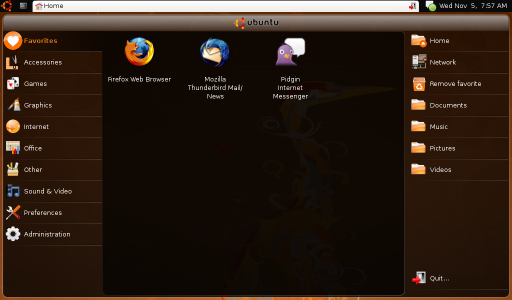
I used the stripped-down flavor of Ubuntu called Ubuntu Netbook Remix (UNR) which is expected to run faster on Netbooks.

The installation went smoothly. And Ubuntu run almost perfectly.

By default, UNR uses its own custom launcher, called UNR Launcher , which is cool but seemed buggy. The top panel disappears and running a gnome-terminal seem to fade behind the UNR Launcher.

My niece is just an average net surfer. She could have a hard time switching desktops from UNR Desktop to Classic Desktop (same as what you see when installing Ubuntu on a desktop PC) and back to UNR Desktop; I have to make this netbook 99% bug-free if not 100%. So I searched for a fix.

From the Ubuntu Netbook Dekstop, run a terminal and type:
gconftool-2 --set /desktop/gnome/session/required_components_list --type list --list-type=string ["windowmanager","panel"]

From the Classic Desktop, run a terminal and type:
gconftool-2 --set /desktop/gnome/session/required_components_list --type list --list-type=string ["windowmanager","panel","filemanager"]

Then all, except for the low volume, is okay.

Last thing I did was to change the theme to look like Windows XP -- I had to, or she could be alienated from a totally new interface.

So I took the GNOME theme called XP Royale, which uses Tango as the default icon but I had to go with GnomeXP icons.

She's happy using it now. Not knowing that she's using Ubuntu. And by the time she realizes that, I know she would be thanking me for showing her a better OS.

Thursday, February 19, 2009

Ubuntu: Repairing 0 bytes free space

I don't have the idea if it's EXT2/3 file system that makes Ubuntu think that my Ubuntu installation has only 0 bytes remaining space -- but I suspect that it is so.

Asking other average Ubuntu users, they also don't know where the problem really lies. It's probably because they natively installed Ubuntu on large partition -- by the way, this 0 bytes problem are commonly experienced by WUBI users.

But they know the solution: "delete unnecessary files, uninstall unused applications"

And so I did. I deleted about 100MB files yet, it's still saying 0 bytes.

I removed application that I don't usually use and I freed about 350MB of space. And yet, it's still saying 0 bytes.

So where does the problem lie? I really suspect it's how EXT3 work. And after reading an article that "Why doesn't [GNU/]Linux need defragmenting", it's all clear.

For Ubuntu not to be defragmented, it should at least have 5% free space to work on it's non-defragmenting trick. Unlike NTFS that it let's you consume to the last remaining free space -- I think. :D

So what exactly is the solution here? There's actually just two way to repair it.

a. Resize your partition.
b. Delete more files, uninstall more application.

The first one is somewhat risky. I really have a bad feeling about resizing partitions.

The second one is quite absurd. You are looking for more space so you can add more stuff, and keep the old stuff.

But either way, try to free as much as possible. My Ubuntu says I have 250MB free space after removing 600MB -- yeah, I myself is a WUBI user.

Thursday, February 5, 2009

Download Ubuntu Pocket Guide and Reference now


One of the much awaited book about Ubuntu is now out.

Written by an award-winning author, Keir Thomas (same author of Ubuntu Kung Fu and Beginning Ubuntu Linux), this book is an indispensable introductory guide.

It talks about history of GNU and the Linux kernel; then Free Software and the Open Source.

It also talks about installing Ubuntu in different ways. Configuring, updating and upgrading Ubuntu. Not to mention, troubleshooting Ubuntu.

You will learn to download and install drivers for your video card, printer, scanners, Wifi cards, and bluetooth device.

If you are wanting how to become a hacker, a security hacker that is, this book will tell you how to defend yourself by installing firewalls and anti-virus, and encrypt files/folders.

Notice I didn't say complete guide? Because it only discussed about the very basics of using Ubuntu, which for general use is quite enough. For only $9.94, this book is juicy.

Now, buy a printed copy or download the PDF copy from UbuntuPocketGuide.com. Don't forget to read the FAQs page on the terms of redistributing a copy to your friends.

Friday, January 30, 2009

WUBI - Ubuntu won't boot; missing root.disk

Did this ever happen to you? It sucks right? You simply wished 'you should have installed natively (the old way)'.

So your Ubuntu won't boot because root.disk is missing, then you check out c:\ubuntu\disks, it's not there. (And probably, disks directory is not even accessible or is missing too.) o_O

So what happened? Your NTFS filesytem got corrupted because on many reasons -- primarily, you might had a power interruption.

Is it lost then? I'm not sure but let's hope it didn't. You can try to recover root.disk by following this steps:
1. Run command prompt as Administrator -- needless to say, 'Enter your password'.

2. Run Check Disk by typing: chkdsk c: /f (change C: to your local disk drive)
NOTE: There's a big change that a message will show.
Chkdsk cannot run because the volume is in use by another process. Would you like to schedule this volume to be checked the next time the system restarts? (Y/N)
Just type Y and restart you PC immediately.

3. After it finished checking (and possibly, repairing) your disk, make sure to show your hidden files.

4. Look for your (onced missing) root.disk under c:\found.000 directory and put it back to c:\ubuntu\disks\.
NOTE: Your swap.disk could also be inside found.000.

Now, try to reboot your Windows and choose Ubuntu then hope that the recovered file is intact and not corrupted. ;)