Showing posts with label windows. Show all posts

Saturday, March 20, 2021

[SOLUTION] Cannot Create Foreign Key

Been a long while since I last needed to have Foreign Key in my Database.

Much of my applications are not so complex that I don't bother employ a Foreign Key.

Now that I have to, it took me about three whole hours figuring out the problem.

I cannot create Foreign Key with HeidiSQL!

I've been using HeidiSQL for over ten years now.  It's only now that I faced problem with this MySQL GUI.

My latest Wamp Server uses MariaDB.

Thinking it could be MariaDB having a problem and not HeidiSQL, I tried using MySQL instead.

Still, with MySQL, I could not successfully create Foreign Key!  And I've been pulling my hairs off!

Somehow, this problem has been discussed over at HeidiSQL forums a year ago.  Even the author of HeidiSQL couldn't figure out why because the problem isn't happening on his side.

Luckily, a user named, Patsy, figured out why.

For some reason, my Wamp Server used MyISAM as default Table Engine instead of the more common, InnoDB.

So, in the end, it wasn't a bug in HeidiSQL.  Neither a bug in MariaDB nor MySQL.

It was a compatibility problem with MyISAM not being able to support Foreign Key

Hope this blog post will save you hours of hair pulling.

Happy hacking!

~creek23

Thursday, May 17, 2018

Game Boy Advance Development 101: Compiling Tank Advance

If you've happen to download Tank Advance source code from Loirak Development, chances are you're having a problem compiling a working GBA file with devkitPro.


That's because of the compiler.


The pre-compiled GBA file inside the Tank Advance ZIP file was compiled 2002 -- that's more than a decade and a half.  Last 2002, GCC was just version 3.  As of this writing, devkitPro is using GCC version 7.


Without much further ado, use the following lines in MSYS2:
arm-none-eabi-gcc -c gfx.c -mthumb-interwork -mthumb -O2 -o gfx.o
arm-none-eabi-gcc -c main.c -mthumb-interwork -mthumb -O2 -o main.o
arm-none-eabi-gcc main.o gfx.o -mthumb-interwork -mthumb -specs=gba.specs -o tank.elf
arm-none-eabi-objcopy -v -O binary tank.elf tank.gba


If successful, you should have a freshly compiled Tank Advance and you can start changing the code to understand how it works so you can start writing your own Game Boy Advance game. :)


Happy GBA deving!


~creek23

Thursday, October 9, 2014

[FFMPEG] Adjust video volume

Before anything else, here's a quick disclaimer:  I do not promote the use of torrent for downloading movies you do not currently own.  Yes, I do download movies but only if I have a DVD/Bluray copy of it.  The only reason I download it so I would have a soft copy -- yes, I suck at ripping DVD/Blurays.

Okay.  Now, onto the issue at hand.

It seems that this torrent group called YIFY is famous among torrent freaks because of quality Bluray rips packed in very small HD files.  Sadly, YIFY configured their rips to lessen the quality of audio.  Which is not a problem for people watching the video on their computers since VLC Media Player can double the movie's volume and everybody's happy.

Well, not quite.

People who have LED TVs happen to enjoy the quality of the movie they downloaded by watching it on their 40~50in TVs.  And it so happen that their TVs doesn't have the feature VLC Media Player has (doubling the volume) -- so they are stuck with the audio quality that YIFY offers with their small-size HD movies.

So how do you fix it?

Have I mentioned my disclaimer, yet?

Anyway, let's use FFMPEG! Just type this into your Command Prompt:

ffmpeg -i "input.mp4" -c:v copy -af "volume=10dB" "thanksToCreekCodes.mp4"

Above ffmpeg command should make sure that you should now have a louder audio while having the same video quality.

I'm pretty sure you understood my disclaimer right?  Well, happy viewing!

~creek23

Friday, May 24, 2013

Compiling Geany on Windows

Can't remember exactly how many times I've tried compiling Geany or even thought of trying to compile it on Windows.  But I remember that my last try was last 2011 -- about February or March.

It's been a while that I've been trying to find a stable and reliable free and open source (not to mention cross-platform) Source Code Editing software so I could strip it down to provide an IDE specifically functioning for my open source game creation project called KAGE.  Finally, -- finally! -- I successfully compiled it yesterday!

I know that Geany's project page has a how-to page for compiling it on Windows but I still had bumps along the way.  This tutorial is simply to compliment what seems to be missing in the official tutorial.

So, just a recap. You need to have this things done already:

Not sure if we also need the GtkMM for Scintilla, but I did have that installed on my machine before I tried compiling Geany for the last time.

Before we proceed, let's make sure that you had the contents of GCC and GTK+ under C:\libs directory.  And that C:\libs\bin is added on your %PATH%, as well as C:\libs\msys\1.0\bin.

Now, for the `complimentary' part of my tutorial.

First, download the Manifest file from Geany's Git repo, which was not included in the downloadable zipped source code.

Rename win32-config.h to config.h then change the content of makefile.win32 from

all: config.h
 $(MAKE) -C tagmanager/ctags -f makefile.win32
 $(MAKE) -C tagmanager/mio -f makefile.win32
 $(MAKE) -C tagmanager/src -f makefile.win32
 $(MAKE) -C scintilla -f makefile.win32
 $(MAKE) -C plugins -f makefile.win32
 $(MAKE) -C src -f makefile.win32

config.h: win32-config.h
 $(CP) $< $@


to this

all: $(MAKE) -C tagmanager/ctags -f makefile.win32
 $(MAKE) -C tagmanager/mio -f makefile.win32
 $(MAKE) -C tagmanager/src -f makefile.win32
 $(MAKE) -C scintilla -f makefile.win32
 $(MAKE) -C plugins -f makefile.win32
 $(MAKE) -C src -f makefile.win32


The reason behind is that, there seems to be wrong with the makefile that the command COPY thinks config.h is supposed to be a directory.

Now, open a command line then run cd to the directory where you extracted Geany's source code.

Finally, type-in: make -f makefile.win32

Wait for it to compile and you'll then end up a very fresh build of Geany on Windows.

~creek23

Friday, February 8, 2013

LMMS: Fixing distorted sound

So I have been casually using Linux Multimedia Studio, or LMMS, since 2010.  It is a really good free and open source alternative to FruityLoops.

I won't go detailing how great this tool is for digitally creating your music as I am assuming you bump onto this post already knowing what LMMS is.

One issue of this tool on Windows is that LMMS keeps distorting your (if I may) compositions, adding buzz and other weirdness to your music.

The problem is even added on its Troubleshooting page but it is still currently unanswered as of this post.

Luckily, the answer is actually already on its Forums posted by a fellow LMMS user, darkill.  And it's just waiting for someone to add it on LMMS' Wiki.

For archiving purposes (just in case the forums and/or the wiki won't be accessible), let me state the steps here on this post.

Open DirectX Diagnostic Tool
  1. Open a Command Prompt
  2. Type-in: dxdiag
  3. Check the tabs with labels "Sound1", "Sound2", etc.
  4. Check for the Driver's name (mine is STWRT.SYS)
  5. Take note of this now do the next steps 
Update LMMS Settings
  1. Run our favorite digital music authoring tool called LMMS :)
  2. Go to Edit -> Settings
  3. Now goto Audio Settings
  4. Change the Audio Interface to SDL (Simple DirectMedia Layer)
  5. Then specify your Driver's Name of your Audio Device on Settings for SDL
Now restart LMMS and hope that the distortion and other weirdness on your music is gone.

Happy composing!

~creek23

Sunday, August 26, 2012

Gimp 2.8 gzdirect problem

This simple solution should fix the problem: "The procedure entry point gzdirect could not be located in the dynamic link library zlib1.dll."

To non-programmers, this error message simply means that your  zlib1.dll is outdated and needs to be replaced.

Somehow, most (if not all) Gimp plugins are using gzdirect which is supposed to be available on  zlib1.dll.

Try checking C:\Windows\System32\ and look for zlib1.dll then rename it to something else, maybe something like  zlib1.dll.old.

So where to get the latest one?  It's actually installed along with Gimp 2.8, but since you have another  zlib1.dll on your Windows' System32 path, Windows is trying to load that copy instead of the copy that Gimp 2.8 has.

Now, re-run Gimp 2.8.

Happy Gimping!

Friday, August 10, 2012

Jenkins: Executing binary from Jenkins script

If anyone of you are having the same problem as detailed on Jenkins forum about not being able to execute any Windows executables from Jenkins Job configuration.  The reason might be that slave-agent.jnlp is running as a service -- and for whatever reason, Windows won't let it run other executables.  To verify if it is the case, try uninstalling the slave-agent.jnlp service -- to do so, use Google -- then try running slave-agent.jnlp as is (meaning, right after executing the code below).

javaws http://yourjenkins.com/computer/yourslaveIP/slave-agent.jnlp

If that didn't solve the problem, sorry but I currently don't have any other solution.

Friday, June 22, 2012

Screencasting with Android

Well, if you are already using the Screencast Video Recorder, there's no use of reading this -- but I'm betting you're not because you stumbled onto this tutorial.

First of all, I am not related to the said screencasting app and I am in no way endorsing it.  I haven't even tried that app yet because 1.) it's not supported on my low-end Android device and 2.) it's a paid app -- yes, I'm cheap, sue me. :P

So this tutorial is about creating a screencast of your Android device using a free and open source tools called Android Screen Capture (or AShot) and FFmpeg.  I should warn you that this tutorial is not for the fainthearted -- it's gonna be messy through setting these tools up, and through creating of the screencast video itself.

I'm going to assume you know what we mean by screencast.  And I'm going to assume you are using Windows on your PC.

To start, download the tools:
AShot - http://sourceforge.net/projects/ashot/files/latest/download
FFmpeg - http://ffmpeg.zeranoe.com/builds/win32/shared/ffmpeg-20120620-git-5a90e55-win32-shared.7z

Here's a very detailed tutorial of setting-up AShot, which I'm very glad not to write over again.  It talks about downloading Android SDK, which AShot uses to capture images from your Android device.  One quick note, however, is the copying of the three files, namely:
  • adb.exe
  • AdbWinApi.dll
  • AdbWinUsbApi.dll
from this directory: C:\Program Files\Android\android-sdk\platform-tools

to this directory: C:\Program Files\Android\android-sdk\tools

Again, simply COPY the three files and not MOVE from one to the other.

Lots of troubleshooting is also discussed on that page, so go thoroughly through that page if AShot won't seem to work.


At this stage, I'm assuming you already got AShot working and you're seeing the same image in your PC as what's on your Android device as shown in the photo above.  You might have also tried screencapturing, and saw a tiny little problem -- (aside from the low FPS which is already answered many times on that page mentioned) instead of a video output, AShot outputs a series of PNGs.  Here's where FFmpeg comes in.

The FFmpeg binary download is just a zip file that can easily be extracted by 7zip or WinRAR -- though, I prefer 7zip.

I'm going to assume you extracted it on the root of your computer in such a way that ffmpeg.exe will be in this path: C:\ffmpeg\bin

And I'm also going to assume that you set AShot to output screenshots on this path: C:\ashot\

Now, all you have to do is open a Command Prompt and type this:
cd c:\ashot\
c:\ffmpeg\bin\ffmpeg -f image2 -i screenshot_%05d.png screencast.avi


Then using any movie player -- I use VLC media player by the way -- you can now view your screencast.avi.

Lastly, if you want to adjust the FPS of your AVI, try adding -framerate X when executing ffmpeg, where X is your desired FPS.

Happy screencasting!

~creek23

Thursday, July 28, 2011

How to Real-time Scan with Clamwin

Clamwin is a free and open source Anti-virus for Windows -- thus the suffix "win". This means that the community provides the developers tons and tons of possible virus infected files thus making Clamwin more efficient in tracking new virus than any other proprietary anti-virus. But there's a catch.

With its large database of virus definitions, Clamwin cannot do a real-time or active scan of your computer. It will not detect a virus-infected file from being copied to and from your computer. Although it does offer a scheduled scan, we know that a real-time scan if far safer.

As quoted from Clamwin's homepage,
Please note that ClamWin Free Antivirus does not include an on-access real-time scanner. You need to manually scan a file in order to detect a virus or spyware.

So how do you make a real-time scan with Clamwin? First, download and install Clamwin if you haven't done already.

Next, download and install complimentary free and open source software called Clam Sentinel.

Clam Sentinel detects file system changes like when some unauthorized program copy, or modify a file. Each file being accesed is thrown to Clamwin to do some virus-checking. This is a good thing if you want to keep your computer safe from unwanted virus. The down side however is that you computer will run slower each time you launch an application, copy files, and such. But this would not be a problem if you are already used to Norton's behavior.

Sunday, March 20, 2011

GCC: G++ ifstream reads extra unwanted characters

Been having trouble with GCC's G++ 4.5.2 with MinGW on Windows. I kept having unwanted characters from a file, which should not be present in the first place.

Given that I have a hello.txt text file that contains,
Hello World
and
Hello Universe


when opened with Notepad or any other text editor, G++ keeps sending me,
Hello World
and
Hello Universe
zpzksmsm3jk4509s


Of course, "zpzksmsm3jk4509s" is just a representation of the garbage data I'm getting. Most of the time, that garbage data is readable. So I usually get something like,
Hello World
and
Hello Universe
He


So there is basically no way for me to know which is a garbage data and which is still part of the file. Somehow, getting the file size doesn't seem to work correctly.

string loadFile(string p_fileName) {
  const char *l_fileName = p_fileName.c_str();
  char *bufPath = new char[strlen(l_fileName)];
    strcpy(bufPath,l_fileName);

  ifstream file(bufPath, ios::in|ios::ate);
  ifstream::pos_type size;
  char * memblock;
  string ret;

  size = file.tellg();
  memblock = new char [size];

  file.seekg (0, ios::beg);
    file.read (memblock, size);
  file.close();

  ret = memblock;
  delete []memblock;
  delete []bufPath;

  return ret;
}


Just so you could follow me further, I am trying to make a simple interpreter. I am barely at the part where I have to tokenize the text content and just had a basic checking of which is a command and which is not.

As I run my interpreter, I get the "expected" error, "Unknown command ` zpzksmsm3jk4509s'". But it's the "zpzksmsm3jk4509s"-part of the message that I was not expecting. As I said, the text file only contains nothing more but
Hello World
and
Hello Universe


It took me a couple of days before finally figuring out the problem.

According to a Cygwin FAQ entry, there seem to be an abnormality with Windows dealing with CR/LF.

From a Notepad's perspective, the hello.txt file is only 32bytes long. That counts Hello World (11 bytes), and (3 bytes), Hello Universe (14), plus two instance of CR and LF (thus, 4bytes).

G++ on Windows, on the other hand, also sees 32bytes. But! As what the Cygwin FAQ page says, it seems, Windows gives you CR and LF as one single character. Meaning, you, as the coder, should only read 30bytes long. That's why G++ is giving me extra He content.

So I had to modify my loadFile from reading the content all at once, into reading the content one character after the other. Then upon reading an 'LF', I will try to check if 'CR' was the previous character, giving me a CR/LF. In which, I will have to lessen my expected length in each instance of a CR/LF.

My code looked sort of something like this.
  int i = 0;
  file.seekg (0, ios::beg);
  while (file.eof() == false) {
    memblock[i] = (char) file.get();
    if (memblock[i] == '\n') {
      if (i > 0 && memblock[i-1] == '\r') {
        memblock[i-1] = '\n';
        i--;
      }
    }
    i++;
  }


Then make sure the last character of memblock would be a string-terminating "\0" since memblock is not a C++ String but a char*.

Now, if you ask, why did you get a CR then LF if Windows only gives you CR/LF as single character? Well, it seems, if you will have to read the file one character after the other, CR won't be CR/LF but simply CR. Making the next simply LF. You could assume that it's more of a G++ problem than a Windows problem. But as the Cygwin FAQ page suggests, it is a Windows file-handling problem.

Saturday, February 12, 2011

MSYS pr not found

Ever got the pr not found error on MSYS?

Not sure why the packages made pr command to be obsolete. But compiling FFMPEG on Windows using MinGW and MSYS requires pr in the toolchain.

Do not worry, it is still on MinGW's download page though not easily accessible. It's hidden inside MSYS/BaseSystem/msys-core/obsolete

But be careful, you will only need the PR.EXE, everything else is unnecessary.

UPDATE: Updated link.

Tuesday, January 11, 2011

Open source Matroska MKV converter

It's been a long time since I blogged about anything.

Is your hard drive (the one where you save you files and all that -- not the other one, if you know what I mean ^^) getting all spaced up because of your video file collections? Despite the number of hard disks in your PC?

Don't sway there's an open source MKV converter that will take care of your AVIs.

As of this post there's simply no better compressed video format than Matroska. Sad as it may be, but MKV is not an open format.

Enter HandBrake, an open source (GPL-licensed) multiplatform video converter available for Mac OS X, GNU/Linux and Windows.

Remember. I'm just showing you a tool to help you get more disk space. I am not telling you to download pirated Hi-Def DVD rips out in the Internet and have the file size get shrank by this tool. Also, what I just said is not a reverse psychology thingy. ;)

EDIT: Been using MKV for more than a year and I never had the slightest idea that MKV was indeed an open format. Thanks robux4!

Monday, June 21, 2010

Red 5: Fixing NetConnection.Connect.InvalidApp Error

Are you having problem connecting to your Red5 server? Is the error message, NetConnection.Connect.InvalidApp?

This happened to me too. Sadly, there was no available help online -- but there is now. ^^

This error occurs when your Flash application is connecting to a non-Flash-compatible service, like Skype for instance.

Skype opens a local connection at port 80 (the HTTP port). So if your Red5 is ran, it wouldn't actually be able to provide the RTMP service correctly, thus giving the NetConnection.Connect.InvalidApp error message.

What's the solution? Simply close Skype, restart Red5, and viola! Your open source media server is back running!

Sunday, March 21, 2010

AS3 and Red5

There seem to be not enough documentation about Red5 and AS3, especially on properly creating a new application, so I thought of writing one.

SOSampleAS3 is a simple Remote SharedObject demo app.The code is a modified Red5's SOSample demo which was written in Adobe Flash IDE and AS2. This is written in pure AS3 on FlashDevelop. Also, it demonstrates remote call using Shared Fridge Magnet tutorial.

How to install the demo webapp?

  1. Extract SOSampleAS3.zip.
  2. Then extract SOSampleAS3-src.zip.
  3. Copy bin directory to C:\Program Files\Red5\webapps\root so it will be:
    • C:\Program Files\Red5\webapps\root\bin\
    • C:\Program Files\Red5\webapps\root\bin\expressInstall.swf
    • C:\Program Files\Red5\webapps\root\bin\index.html
    • C:\Program Files\Red5\webapps\root\bin\SOSampleAS3.swf
    • C:\Program Files\Red5\webapps\root\bin\js\swfobject.js
  4. Extract SOSampleAS3-webapp.zip.
  5. Copy SOSampleAS3 directory to C:\Program Files\Red5\webapps so it will be:
    • C:\Program Files\Red5\webapps\SOSampleAS3\
    • C:\Program Files\Red5\webapps\SOSampleAS3\META-INF\MANIFEST.MF
    • C:\Program Files\Red5\webapps\SOSampleAS3\WEB-INF\classes\org\red5\server\webapp\elcMagnets\Application.class
    • C:\Program Files\Red5\webapps\SOSampleAS3\WEB-INF\lib\elcMagnets.jar
    • C:\Program Files\Red5\webapps\SOSampleAS3\WEB-INF\red5-web.properties
    • C:\Program Files\Red5\webapps\SOSampleAS3\WEB-INF\red5-web.xml
    • C:\Program Files\Red5\webapps\SOSampleAS3\WEB-INF\web.xml
  6. Restart your Red5 Server.
  7. Open your browser and set address to http://localhost/bin/.

That's it!

Tuesday, March 16, 2010

Open Source Alternative to Daemon Tools Lite

It was cool to know that there is something like of Daemon Tools Lite that runs on Ubuntu GNU/Linux -- that is GMount ISO. Sadly, it only runs on GNU/Linux platforms.

Getting back on Windows, I wondered if there is other open source Daemon Tools Lite that runs on Windows. Luckily, there is one -- it is called WinCDEMu. Go try it for yourself.

Thursday, March 4, 2010

Getting Started with GTK on Windows

I am assuming that you already know GTK+ and wanted to try it out for the first time. This article will discuss how to setup your development environment to start writing GTK+ based applications.

First things first, download everything you need.

Download GTK from GTK.org -- I downloaded gtk+-bundle_2.18.7-20100213_win32.zip.

Optionally, download libiconv from GTK.org -- as of this writing libiconv is version 1.9.1.

For C editor, I am using MinGW Developer Studio. It is the easiest to setup in compiling GTK+ applications since it already works well with MingGW, the recommended toolchain when using GTK. Sadly, the developer's website is somewhat down or possibly currently doing a revamp. But you can easily get version 2.0.5 from list of mirrors courtesy of TextEditors.org.

Setting them up

Install MinGW Developer Studio.

Extract gtk+-bundle_2.18.7-20100213_win32.zip then place content in C:\Gtk+\{here}

Same with libiconv, extract libiconv-1.9.1.bin.woe32.zip then place all contents in C:\Gtk+\{here}

Configuring MinGW Develop Studio.
  1. Launch the editor
  2. Click Edit -> Options... to open the Option dialog box.
  3. Click the Directories tab
  4. On Show directories for,
    • select Include files then add the following paths:


      • C:\Gtk+\include
      • C:\Gtk+\lib\glib-2.0\include
      • C:\Gtk+\lib\gtk-2.0\include
      • C:\Gtk+\include\cairo
    • select Library files then add this path:


      • C:\Gtk+\lib
Testing it out.
  1. Launch MinGW Developer Studio
  2. Click Project -> New Project to open New dialog box.
  3. Select GTK+ Application and indicate HelloGTK as Project Name
  4. Click OK to create new project.
  5. Click File -> New to open New dialog box.
  6. Select C/C++ Source File and indicate hellogtk.c as File name.
  7. Click OK to create new file.
  8. Type in the code below then press F5 to compile and run the program.

If you are having problem running you hellogtk application, you might need to install GTK+ runtime. I use GIMP, which installs the runtime -- try to download and install a copy of GIMP for Windows.

Where to go from here? Read the official documentation and tutorials.

Wednesday, January 13, 2010

What If 2012 happens?

Been months since I watched 2012 but I still can't remove it in my mind, "What if 2012 happens?"

With billions of dollars in bank, Bill Gates will surely get on board. How about Richard Stallman? Linus Torvalds perhaps?

As a developer, it makes me think, should I still be doing the "right" thing for people? Or should I do the "right" thing for me and my family -- to start hoarding tons of money by selling patented proprietary software...

Another thing that puzzles me, "What kind of software will be saved?". Or better yet, "What kind of software will power the computers of the next generation?". Microsoft's Windows and Visual Studio? Google's Chrome and Go? Perhaps Canonical's Ubuntu, thanks to Mark Shuttleworth.

I hope my small programming language will be saved along with other free and open source projects on SourceForge.

So, I ask you, "What if 2012 happens?"

Friday, July 17, 2009

Want a free Mac OS?

Unless you buy an iPod Shuffle for US$1078, then you can get your MacBook for free. :P

Seriously, I long to have one either. But until then, I stay with theming my current OS. ^^

I started wanting to try Mac way back 2006 just to escape the Windows world once in a while. Though, back then, I'm already trying out GNU/Linux just to learn something new.

Upon learning that Mac OS are only bundled on a Mac machine -- no retails available, I started looking for Mac themes for Windows. It's then that I heard about WindowBlinds and ObjectDock, YzShadow and other freewares and sharewares on the net that help tweak Windows theme into a Mac. Good thing FlyAKite OSX existed -- it did all the dirty jobs for me.

Playing around with my Mac-themed Windows, I wasn't all too happy as it didn't give the UNIX feel.

So I turned into my GNU/Linux box and started looking for FlyAKite OSX for GNU/Linux. Sadly, there was none at that time. Yes, you can find some wallpapers, icons and sounds but it's not close to what FlyAKite did to my Windows box.

Year later, here comes Mac4Lin. I installed it on my newly upgraded Ubuntu Feisty Fawn. Though, you still have to do some dirty works installing the replacements -- reading 6 pages of how-to.

But all that changed last June 2009, as Mac4Lin v1.0 has been released. Automating it all with shell scripts.

Now, everybody can have a free Mac OS -- well a Mac-themed UNIX-like free OS. :D

As Michael Jackson sung it, "easy as 1-2-3":
  1. Install Ubuntu
  2. Install Mac4Lin
  3. Enjoy!
Sweet!

Friday, June 12, 2009

Ubuntu 9.04 on MSi Wind U100

I installed Ubuntu 9.04 (Jaunty Jackalope) on a Micro-Star International (MSi) Wind U100 for my 10 year old niece about a week ago. It was my first time to install from flash drive, good thing resources on how-to is vast. I went directly to the Ubuntu's instruction.

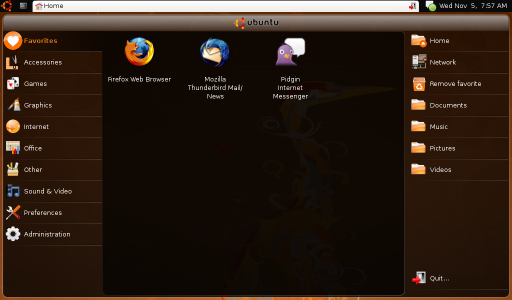
I used the stripped-down flavor of Ubuntu called Ubuntu Netbook Remix (UNR) which is expected to run faster on Netbooks.

The installation went smoothly. And Ubuntu run almost perfectly.

By default, UNR uses its own custom launcher, called UNR Launcher , which is cool but seemed buggy. The top panel disappears and running a gnome-terminal seem to fade behind the UNR Launcher.

My niece is just an average net surfer. She could have a hard time switching desktops from UNR Desktop to Classic Desktop (same as what you see when installing Ubuntu on a desktop PC) and back to UNR Desktop; I have to make this netbook 99% bug-free if not 100%. So I searched for a fix.

From the Ubuntu Netbook Dekstop, run a terminal and type:
gconftool-2 --set /desktop/gnome/session/required_components_list --type list --list-type=string ["windowmanager","panel"]

From the Classic Desktop, run a terminal and type:
gconftool-2 --set /desktop/gnome/session/required_components_list --type list --list-type=string ["windowmanager","panel","filemanager"]

Then all, except for the low volume, is okay.

Last thing I did was to change the theme to look like Windows XP -- I had to, or she could be alienated from a totally new interface.

So I took the GNOME theme called XP Royale, which uses Tango as the default icon but I had to go with GnomeXP icons.

She's happy using it now. Not knowing that she's using Ubuntu. And by the time she realizes that, I know she would be thanking me for showing her a better OS.

Wednesday, June 10, 2009

Chrome 2 vs Firefox 3.6

I was actively participating with testing Firefox (or called Minefield) before Firefox 2 even came out. Then I delve myself to testing other FOSS (Inkscape, Synfig, Pencil) and even started contributing as a developer (KonsolScript, Clash).

Some years later, Chrome came out with a powerful JavaScript engine, V8. It surely was powerful having to render 3D scene written in JavaScript -- I was surely disappointed at how Firefox was not evolving at all anymore.

I used Chrome for almost a year. I was totally satisfied at its speed. Then came Chrome 2.

There were some changes that made Chrome 2 less user-friendly:
  • Deleting of history and download list individually -- you now have to clear it all or have a long list of mixed wanted and unwanted download list.
  • Not completely removing the SQLite files used for history and/or possibly page caching.
  • Unable to finish the page when user has low disk space available.
Firefox 3.6a1pre on the other hand still has that user-friendliness while trying to catch up Chrome's V8 capability.

To witness Firefox' improved speed, download from:
http://ftp.mozilla.org/pub/mozilla.org/firefox/nightly/latest-trunk/

Install it then check Chrome Experiments website. The site enlists heavy JavaScript-driven web applications that only browsers like Chrome could easily run.

I had a good time playing World of Solitaire, which almost gave the feeling of simply playing Windows' Solitaire.

But I was particularly impressed with JS Touch, where it renders 3D scene of a hanging cloth. It makes me wonder, when will I see a 3D JavaScript game running from inside a browser.

Firefox also implemented tearing-off tabs out and into opened Firefox windows like Chrome does. Sadly it still has the same problem of memory bloat -- caused by hour-long surfing.
Overall, I'm surely going to get back using Firefox (or in this case, Minefield).